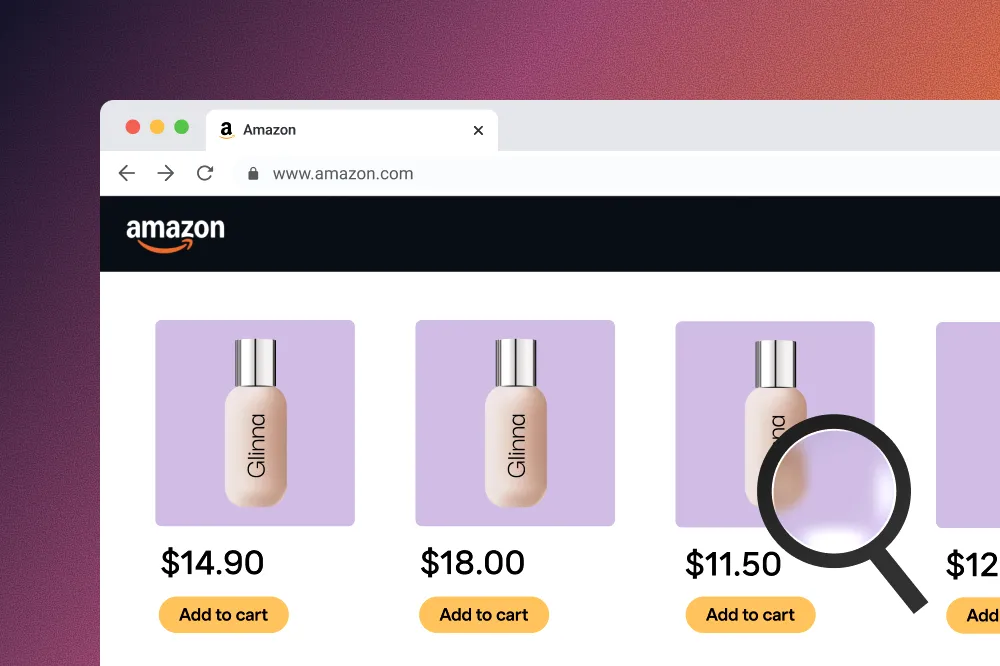
When marketplaces match on unit price, you need multi-bundle price monitoring
Coupang matches the lowest price per unit, and automatic bundles multiply pack sizes. Multi-bundle monitoring finds the bundle that sets your price.
 Jinie Park4 min read
On this page6
- Why multi-bundle pricing needs managing
- Why do bundle pricing problems keep coming back? - Unit-price matching, explained simply
- Marq AI’s multi-bundle price monitoring
- How multi-bundle monitoring changes price management
- If this sounds familiar, it’s time for structural management
- FAQ | Multi-bundle price monitoring
Why multi-bundle pricing needs managing

As e-commerce matures, brands compete on price less with single products and more with bundles, such as “buy one, get one” deals and bulk boxes. On marketplaces such as Coupang, it’s now standard to compare and match the lowest price on unit price rather than a product’s total price.
On top of that, “automatic bundling by e-commerce platforms” is spreading: when lowest-price conditions are met, the same product is listed automatically in several bundle sizes, whether or not the seller intended it. Bundles are no longer just a sales option. They’re the benchmark that sets prices across the whole brand.
So even if no bundle is deliberately disrupting prices, the one bundle with the lowest unit price can become the benchmark and drag down other bundles and even your core products. Many brand teams keep hitting the same problem: “Prices clearly dropped, but we can’t tell which bundle set them.”
Checking listings one by one, the traditional way, can’t show the price structure that links bundles to one another through unit price. It’s no longer enough to confirm that prices fell. You need to understand and manage which bundle has become the benchmark for everything else. That’s where bundle price monitoring comes in.
What is bundle price monitoring? In an environment where the same product is sold in different quantities and configurations, bundle price monitoring compares and analyzes each bundle’s total selling price together with its unit price to understand how prices form and get matched. It goes beyond “what is each product selling for” to show which bundle’s unit price is acting as the benchmark for other products.
Why do bundle pricing problems keep coming back?
- Unit-price matching, explained simply

To give shoppers the lowest price, marketplaces such as Coupang compare prices by unit price. Among 10-, 20- and 30-pack bundles of cola, the bundle with the lowest price per can becomes the benchmark for the overall price.
And increasingly, the same product is listed automatically in several bundle sizes whenever it meets the marketplace’s lowest-price conditions, even if the seller never created the bundles. As a result, the same cola is listed as 10-, 20- and 30-can bundles at once, and the 20-can bundle with the lowest unit price becomes the benchmark for the overall price.
Shoppers get a lower unit price. Brands see the unit price they need to hold collapse, with a direct hit to pricing policy and operating profit.
The problem is that this automatic bundle creation and price matching happens:
- Very fast
- Automatically
- In ways brands can hardly anticipate or intervene in
As a result, a single bundle the brand never intended can become the unit-price benchmark, affecting other bundles and even core product prices all at once. Brand teams keep finding themselves in hard-to-explain situations: “Prices clearly dropped, but which bundle set them?” That isn’t negligence. It’s a limit of traditional methods, which can’t see the structure once the benchmark is spread across many bundles instead of one product.
Put simply, the old approach of “just monitor one product well” no longer works.
Marq AI’s multi-bundle price monitoring
To overcome these limits, Marq AI offers multi-bundle price monitoring, which analyzes prices across an entire product group (model group) rather than looking at each product separately.
The key to multi-bundle price monitoring isn’t listing more products. It’s seeing at a glance the price-matching structure that links bundles to one another through unit price.
That way you can pinpoint the “benchmark bundle” that moves other products’ prices, which was hard to find when you checked one price per product.
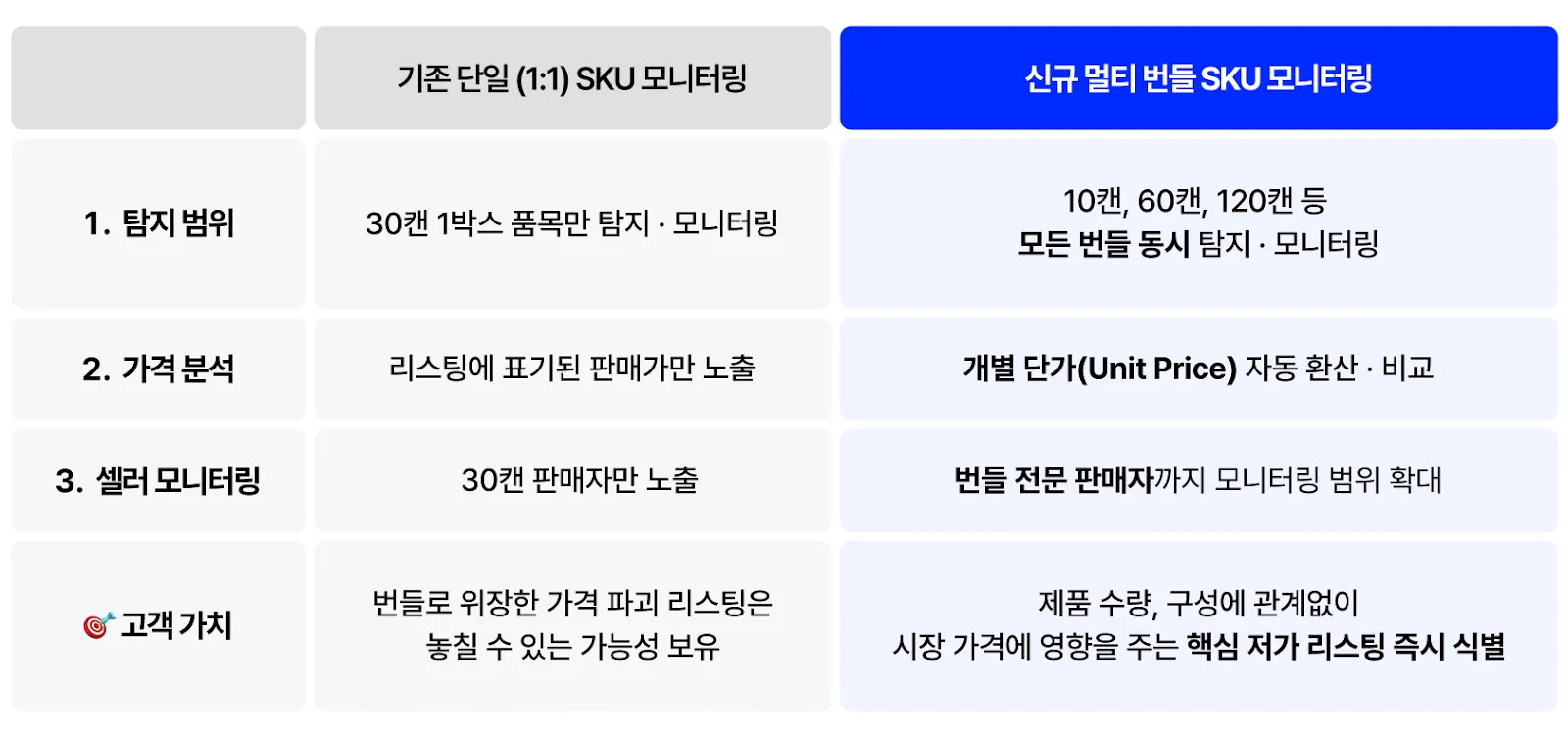
How multi-bundle monitoring changes price management
1. Integrated analysis of bundles within a product group
Set one reference product, and all bundles of every quantity and configuration in the same product group are analyzed together automatically.
For example, if you set a “250ml single unit” as the reference, all bundles sold on online marketplaces, such as 10-, 30- and 60-packs, are grouped together for review.
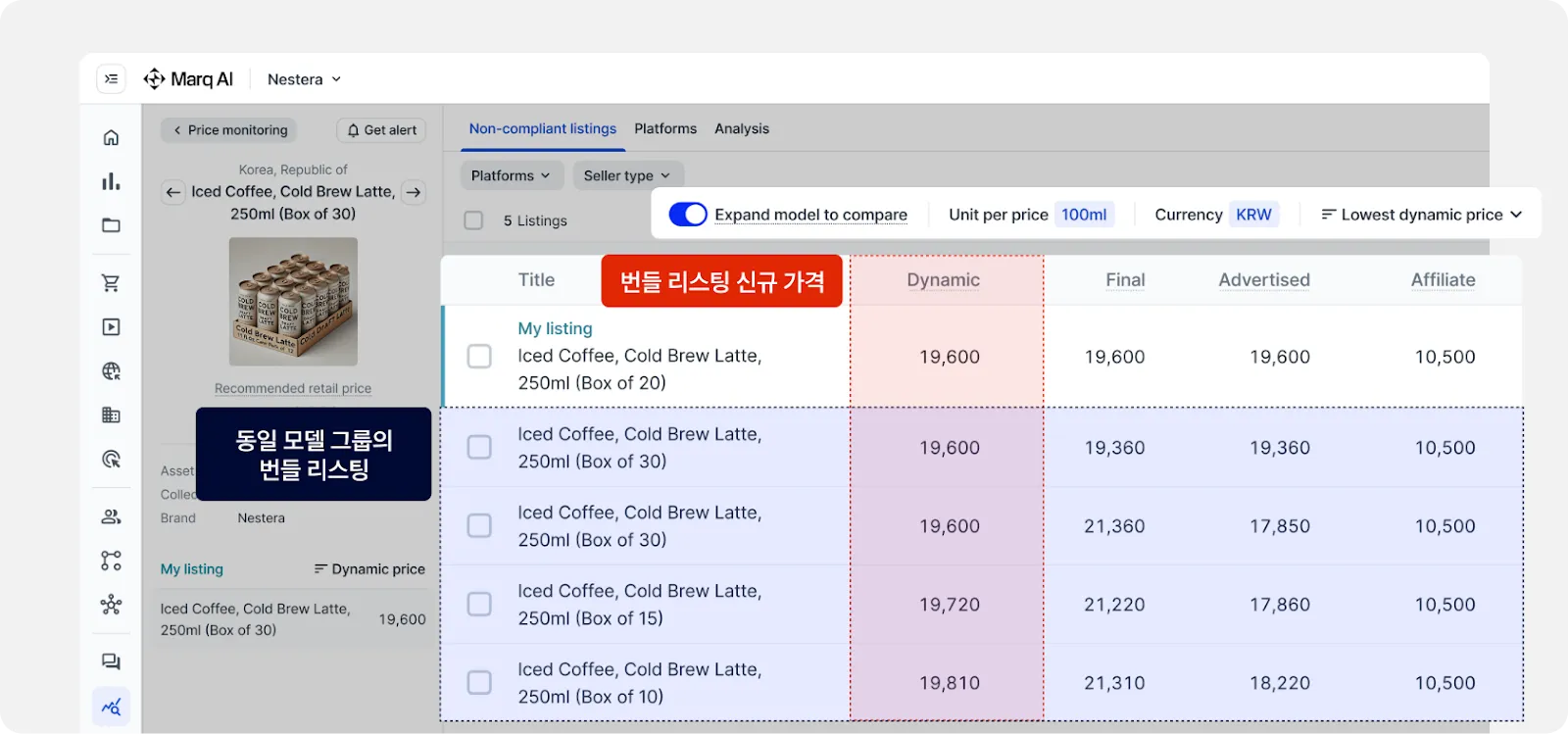
This lets you quickly see which bundle became the starting point for the unit-price benchmark.
2. Automatic conversion to and comparison by unit price
Each bundle’s total selling price is automatically converted to a unit price.
For example, if canned coffee that needs to stay at 850–900 won per can is selling as shown below, the 10-pack with the lowest unit price is immediately flagged as the product most likely to become the price benchmark.
- 30-pack bundle: 850 won per unit (OK)
- 20-pack bundle: 860 won per unit (OK)
- 15-pack bundle: 900 won per unit (OK)
- 10-pack bundle: 650 won per unit (warning)
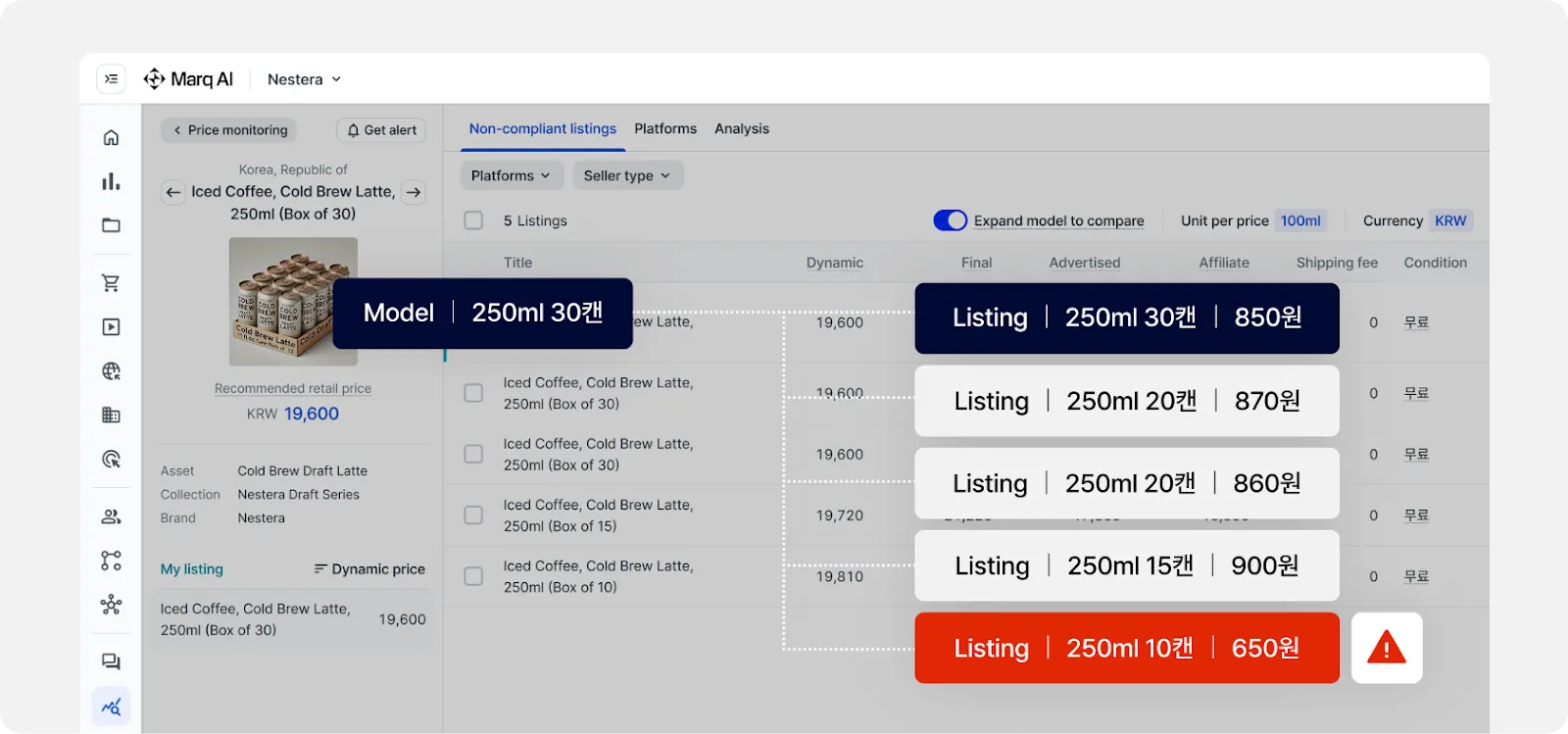
No more comparing unit prices across bundles by hand: manage SKU unit prices in one place.
3. Identifying sellers who exploit price matching
Some sellers keep single units at the normal price while using large bundles to lower the unit price and trigger price matching. Multi-bundle monitoring shows these patterns across the whole product group at once, so you can structurally identify sellers who repeatedly unsettle the price benchmark.
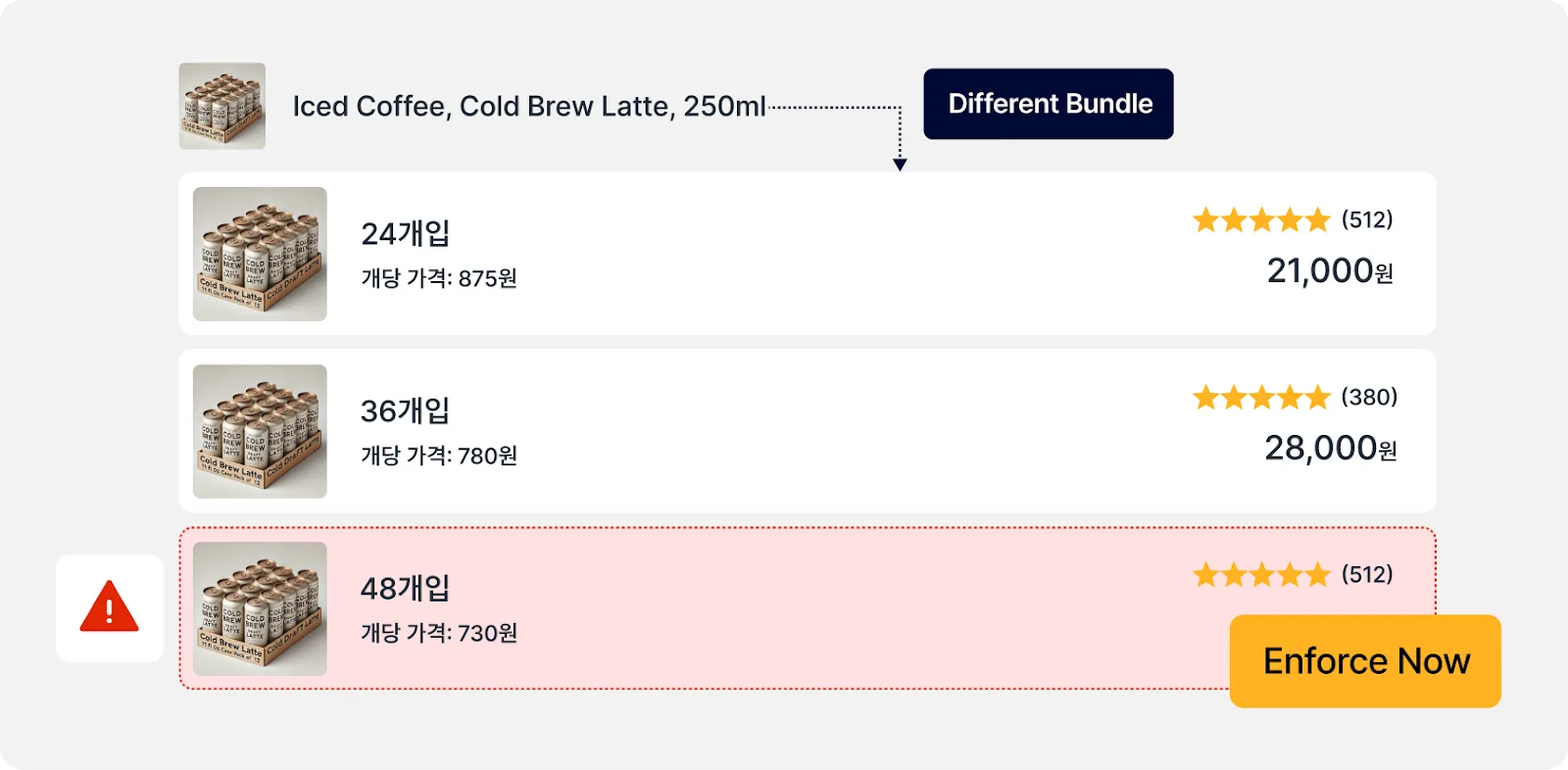
For example, if the same seller repeatedly lists bundles that differ only in quantity, such as 24-, 36- and 48-packs, gradually lowering the unit price, you can see that pattern on one screen and take action.
If this sounds familiar, it’s time for structural management

If unit-price matching keeps making one bundle the price benchmark for other products, watching individual products won’t keep your pricing under control. And if prices keep moving together when only the bundle configuration or quantity has changed, it’s probably not a one-off. It’s the combined result of 1P pricing policy, quantity-option price matching and bundle strategy.
What brands need now isn’t to chase falling prices after the fact, but a system for managing which bundle becomes the benchmark and how far its effects reach. Marq AI’s multi-bundle price monitoring is the starting point for turning this complex price-matching structure into a structure you can see.
If your brand is already seeing price swings from bundles, or needs proactive management to prepare for automatic bundling, work with MarqVision to check your brand’s pricing blind spots and respond structurally.
Understanding your current price structure at the product-group level is the first step to taking back control of your brand’s pricing.
FAQ | Multi-bundle price monitoring

Q. What exactly does multi-bundle price monitoring do?
A. When the same product is sold in several bundles, such as 10-, 20- and 30-packs, it compares each bundle’s total price and unit price on one screen to find “which bundle became the price benchmark.” It lets you see and manage how prices link across bundles (benchmark, then spread).
Q. Why is it even more necessary with automatic bundling?
A. As automatic bundling grows, the same product is listed in many quantity combinations at once, sharply increasing the number of bundles that could become the price benchmark. When the bundle with the lowest unit price becomes the benchmark, other bundles and core products can be affected too, so you need to manage the structure at the product-group level.
Q. Do we have to register every bundle?
A. No. Because the multi-bundle approach lays out bundle configurations for a whole product group at once, you can first find the benchmark bundle and the configurations or sellers that repeatedly cause problems, then selectively expand your management priorities and scope to suit your brand.
Q. What counts as a “benchmark bundle”?
A. Among several bundles, it’s the one with the lowest unit price, which acts as a reference point when other bundles or core products are compared and matched on price. Once that bundle becomes the benchmark, prices for other products can start to slide too.