September was about two things: looking for infringements in more places, and making it easier to see where every listing and seller stands. Here's what's new in Marq AI.
TL;DR Sharing September 2026 product updates:
- Paid ads protection beyond Meta: Google, Bing, and TikTok
- Catch listings on more marketplaces, by keyword or by image
- Find any listing with one search, in a cleaner dashboard
- Review websites, domains, and ads in a grid
- See where every Price Monitoring listing stands
- See Google delistings next to content removals
- Get a seller overview at the top of Seller Management
- Authorize a seller for one brand, not your whole account
- Run each Brand Intelligence Agent task on its own schedule
Paid ads protection beyond Meta: Google, Bing, and TikTok
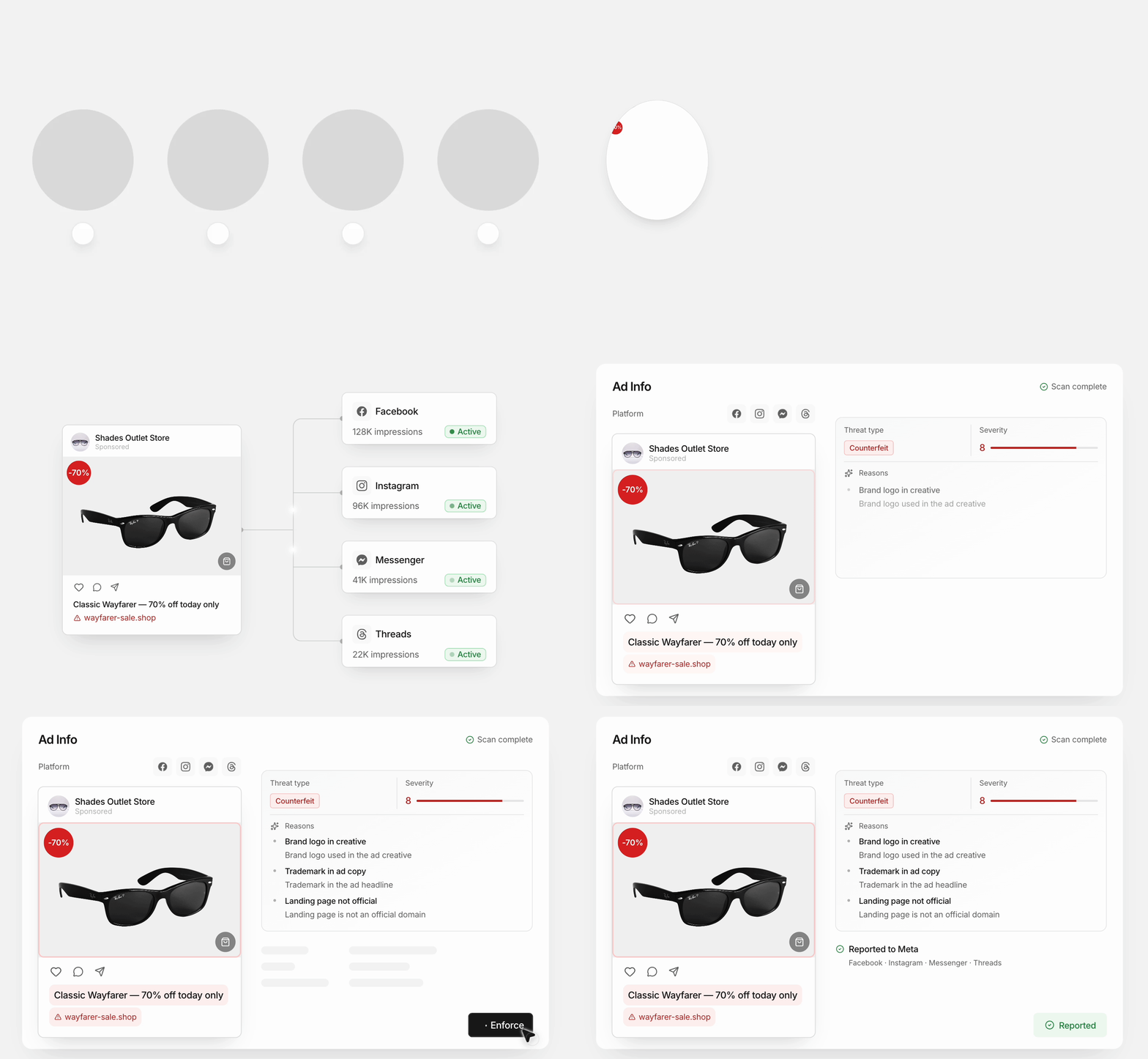
Paid Ads started on Meta. It now covers Google, Bing, and TikTok too, in the same dashboard and the same workflow. For the brands we scanned in September, that means up to 5x more ads under watch.
How this helps you:
- Catch scam ads where shoppers act on impulse, in TikTok videos, and where they search for you by name, on Google and Bing
- See the sponsored results your customers see in each market, not just what shows up from your headquarters
- Review ads from all four platforms in one Flagged queue. Once you approve, we file the report with the platform
Why we expanded Paid Ads beyond Meta: read the launch post.
Catch listings on more marketplaces, by keyword or by image
We added new marketplaces in September and moved several others onto automated scanning. Image search, which finds listings that use your product photos without your brand name, now reaches more of them too.
How this helps you:
- Cover two Korean resale platforms, KREAM and Soldout, and Temu Mexico
- Get automated scanning on Trendyol, Kleinanzeigen, leboncoin, Kijiji, and OfferUp
- Catch look-alike listings by image on TikTok Shop across 17 country sites, and on more marketplaces including eBay, AliExpress, Amazon, Shopee, Lazada, and Coupang

Find any listing with one search, in a cleaner dashboard
The search bar in Marketplace and Social Media now looks across every status at once. You don't need to know whether a listing is in Review Needed, Reported, or Removed to find it.
How this helps you:
- Find a listing by product title, seller, listing ID, or test purchase ID from one search box
- See what needs attention faster: AI labels are now grey, and only Suspected Counterfeit keeps its color
- Act from one main button: Enforce is up front, and other actions sit under the ··· menu
Search takes one ID or product at a time for now.

Review websites, domains, and ads in a grid
Website Content, Domain Names, and Paid Ads now have a Grid View. Switch between the grid and the table whenever you like.
How this helps you:
- Scan thumbnails of sites, domains, and ads first if you review by eye
- Keep the table for detailed data and large reviews

See where every Price Monitoring listing stands
If you use Price Monitoring, you can now follow each listing after it's reported. Its current stage, re-report count, and price at the time of reporting all show in the dashboard.
How this helps you:
- See how many listings sit at each enforcement stage for a model, then click a stage to filter the list
- Check a listing's status and re-report count right in the list, and see on the price chart when it was reported and what it cost then
- Track results in a Removed tab, and watch a Sold out tab for sellers who go out of stock and come back

See Google delistings next to content removals
In Website Content and Domain Names, the Reported, Removed, and Denied tabs now show Google delisting outcomes alongside content removal.
How this helps you:
- Count a site dropped from Google search as an enforcement result, even while the site itself is still up
- See every layer of enforcement for a site in one place

Get a seller overview at the top of Seller Management
Seller Management now opens with a summary of the sellers behind your brand's infringements. You see the scale and where the risk sits before you scroll into individual sellers.
How this helps you:
- See your active sellers, your active repeat offenders, and how many flagged listings those repeat offenders hold
- See how the risk spreads by region, counted by seller or by listing
- See which platforms your repeat offenders are concentrated on

Authorize a seller for one brand, not your whole account
Authorized sellers are now set per brand. When you register an official seller, you choose which brands they're authorized for, instead of whitelisting them across your account.
How this helps you:
- Keep monitoring a seller's listings for your other brands after you authorize them for one
- Pick the brand right where you add a seller to the authorized list, in Review Needed, Listings, Website Content, Domain Names, or Paid Ads
- See official and unofficial sellers per brand in Seller Management and Price Monitoring
If you manage a single brand, nothing changes for you.

Run each Brand Intelligence Agent task on its own schedule
Scheduled tasks in the Brand Intelligence Agent used to run together at one fixed time. Now each task has its own schedule.
How this helps you:
- Run a task daily, on weekdays, weekly, or monthly, at the time you pick, in your own time zone
- Set email notifications and reports for each task, right from the task
- See upcoming runs, the latest run, and unread results in the task list
Tasks now stay on until you've gone two weeks without signing in. Before, they paused after three days without a check.

That's September. See you next month with what shipped in October.
Stay up to date on the latest IP Protection content from MarqVision.



4 Enforcements a Week to 400: Scale Brand Safety with Marq AI

Don’t Just Find Counterfeits. Dismantle the Entire Network.

.png)
Discover the latest trends and challenges in IP protection

Take Control of Your Trademarks with MARQ Folio
Renew and Manage Your Trademarks Easily With MARQ Folio

We’re waiting to hear from you

See the best brand protection solution in action

Don’t let piracy steal your growth

Talk to us about your brand protection problems